Seller Profit Spreadsheet Kit
One Excel workbook for Shopee and Lazada prices across six countries. You fill in your costs. The sheet calculates fees, profit, margin, break-even, and a target-margin price.
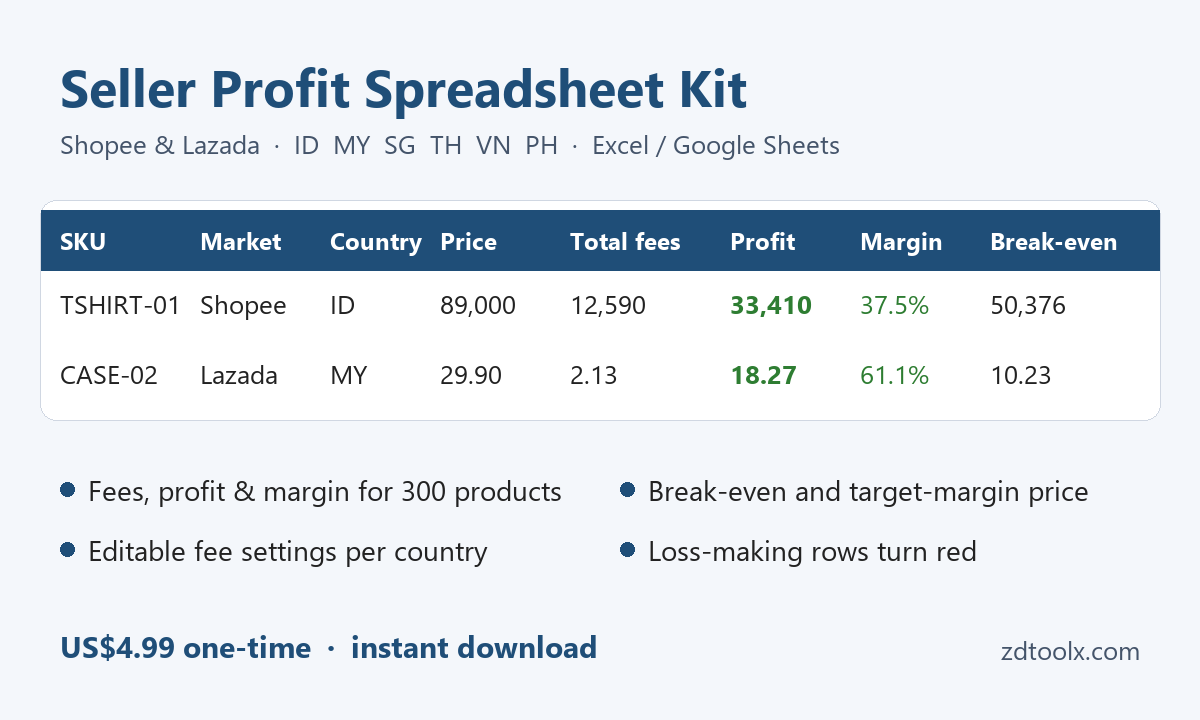
Example layout only. The prices in the picture are samples, and the line “instant download” on the picture is not the checkout flow. Creem sends a license key; the workbook is created when you paste that key below.
What you get
After a valid ZD-SK license key is accepted, the server builds ZDToolx-Seller-Profit-Kit.xlsx. It opens in Microsoft Excel, Google Sheets, and LibreOffice. The workbook has three sheets:
How to use
Short instructions for the other two sheets: which cells you type in, and which cells the formulas fill in.
Fee settings
Starting rates for Shopee and Lazada in Indonesia, Malaysia, Singapore, Thailand, Vietnam, and the Philippines. Each row can include commission, a transaction or payment fee, and up to two programme fees (such as free shipping and cashback), with caps. Every rate is editable so you can match your category.
Products
About 300 rows. For each product you enter price, voucher, unit cost, packaging, and shipping. Formulas fill in fees, profit, margin, break-even price, and the price for your target margin. Rows that lose money turn red.
What you do not get
- No Seller Centre connection. The file does not sign in to Shopee or Lazada, import listings or orders, or update fees from your shop.
- Fee rates need a check. The numbers in Fee settings are defaults. Real rates depend on category, programme, and seller type, and the marketplaces change them. Read the current rate in Seller Centre and type it into Fee settings before you trust a price.
- No shop operations. This is not a listing uploader, inventory system, or tax filing tool. Results are a pricing estimate, not financial or tax advice.
After you pay
- Pay on Creem. Checkout is on Creem, our merchant of record. The price is US$4.99 once. There is no subscription. Open checkout.
- Read the email. When payment succeeds, a license key that starts with ZD-SK- is sent to the email address you paid with. Check spam if it is not in the inbox within a few minutes.
- Paste the key. Put it in the box on this page. If the email never arrives, open inbox.zdtoolx.com/license and look it up with that same purchase email. The lookup lists every ZDToolx product on that email — copy the key that starts with ZD-SK-.
- Download the workbook. Choose Download .xlsx. The file is generated for that key. Save it and open How to use first. Keep the key; you can request the file again from this page.
14-day money-back guarantee. Email support@zdtoolx.com with your order email. A refund turns that license key off. Details are in the refund policy.
Download your workbook
Use the ZD-SK key from the payment email, or the one shown on the license lookup.
Free calculators
For a single product, the free tools on seller.zdtoolx.com calculate Shopee or Lazada profit in the browser. Nothing is uploaded. They are a separate product from this workbook. The same tools are available in Indonesian at seller.zdtoolx.com/id.
FeedMorph is a separate tool. It converts a Shopify products export, a WooCommerce products export (Products → Export), or specific Amazon Seller Central CSV reports into TikTok Shop batch-listing columns, not TikTok's official leaf-category Seller Center template. Amazon support covers the Active/All Listings Report, Inventory Loader / Open Listings (sku, price, quantity — the product name may be missing), listing flat-file common columns, and FBA inventory fulfillable quantity. fulfillment_latency and leadtime-to-ship are not stock. Details and limits. Free 10-row preview on convert.zdtoolx.com. The $9.90 Pro Pass unlocks the full export with a ZD-FM key.
Untuk penjual Indonesia
Isi harga dalam Rupiah. Angka fee Shopee dan Lazada di sheet Fee settings hanya titik awal, bukan tarif resmi. Cek angka di Seller Centre, lalu ubah sendiri di sheet itu. Kalkulator gratis dalam Bahasa Indonesia: seller.zdtoolx.com/id. File yang diunduh tetap berbahasa Inggris (sheet How to use, Fee settings, dan Products).
Good to know
- Digital download only. Nothing is shipped.
- ZDToolx is not affiliated with Shopee or Lazada.
- Questions: support@zdtoolx.com.